

The Philippines eTravel QR code is a free, mandatory digital clearance issued after completing your eTravel registration at etravel.gov.ph. Every traveler entering the Philippines must complete eTravel registration within 72 hours before arrival to receive a QR code that immigration officers scan at the border. The system replaced the old paper eArrival Card in December 2022 and remains required for all arrivals in 2026. If you are planning a trip to the Philippines, learn more about what the eTravel Pass is and how the entire registration process works.
What Is the Philippines eTravel QR Code?
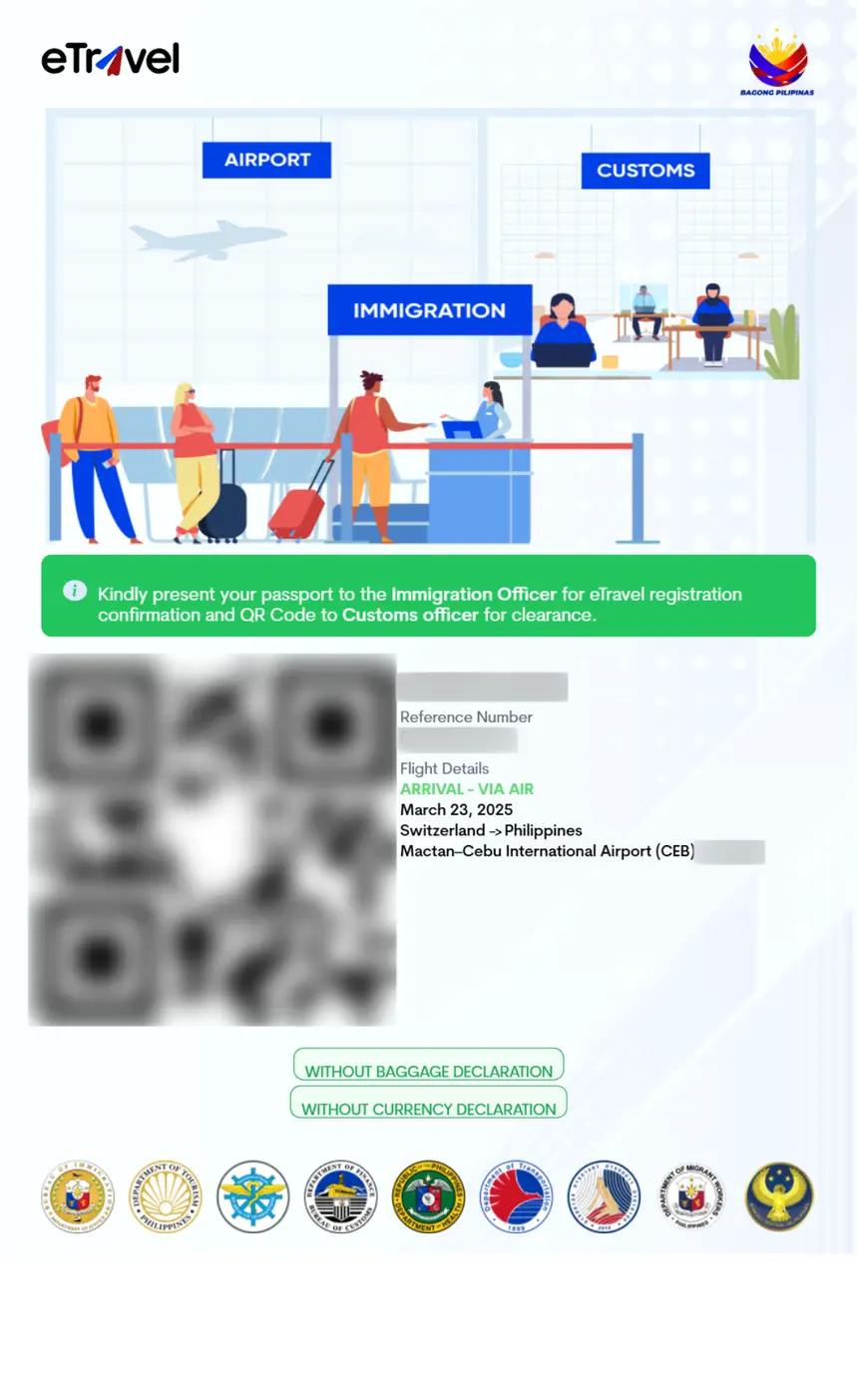
The eTravel QR code is a unique, color-coded barcode generated automatically when you complete your registration on the official Philippine Travel Information System at etravel.gov.ph. It serves as your digital arrival clearance and replaces the paper forms that travelers previously filled out on the plane.
The QR code comes in two colors, and understanding what each color means helps you prepare for a smooth arrival. For a complete overview of all entry requirements, see our guide on eTravel Philippines requirements.
- Green QR code — Your submitted information is complete and correct. You are cleared for entry and can proceed through immigration with minimal delay.
- Red QR code — Your information may be incomplete, incorrect, or flagged for additional verification. Expect further checks at the immigration counter.
Your QR code is sent to your registered email address and is also accessible through your eTravel account dashboard or the eGovPH mobile app.
Who Needs the eTravel QR Code?
The eTravel registration (and resulting QR code) is mandatory for:
| Traveler Category | Registration Required? |
|---|---|
| Filipino citizens arriving | Yes |
| Foreign nationals arriving | Yes |
| Airline crew members arriving | Yes |
| Filipino citizens departing | Yes |
| Foreign nationals departing | No |
| Cruise passengers | Yes (separate cruise registration) |
All arriving passengers — regardless of nationality — must present a valid eTravel QR code before boarding their flight and again at Philippine immigration.
How to Get Your Philippines eTravel QR Code
Follow these steps to register and receive your QR code:
Step 1: Visit the Official Website
Go to https://etravel.gov.ph and click “Sign In” or “Register.” You can also download the eGovPH app from the Apple App Store or Google Play Store.
Step 2: Create Your Account
Provide your email address and create a password. Verify your email through the confirmation link sent to your inbox.
Step 3: Fill Out the Registration Form
Complete the digital form with the following information:
- Full name (as it appears on your passport)
- Passport number and nationality
- Flight details (airline, flight number, date of travel)
- Philippine address during your stay
- Health declaration
Step 4: Submit and Receive Your QR Code
After submitting the form, the system generates your QR code instantly. A green QR code means you are cleared; a red QR code means additional checks may be needed at immigration.
Step 5: Save Your QR Code
Take a screenshot of your QR code or save the email confirmation. You will need to present it at the airport check-in counter and at Philippine immigration upon arrival.
When to Register for eTravel
You must complete your eTravel registration within 72 hours (3 days) before your flight departure. The system does not accept registrations earlier than 72 hours before travel.
| Registration Timing | Status |
|---|---|
| More than 72 hours before flight | Not yet available |
| Within 72 hours before flight | Accepted |
| Less than 24 hours before flight | Accepted but not recommended |
| After landing in the Philippines | Late registration at airport kiosks |
eTravel QR Code vs. Philippine Visa
The eTravel QR code is not a visa. It is a digital arrival declaration form that collects your travel and health information. You still need a valid visa or visa-free entry qualification to enter the Philippines, depending on your nationality.
| Feature | eTravel QR Code | Philippine Visa |
|---|---|---|
| Purpose | Digital arrival card | Entry permission |
| Cost | Free | Varies by type |
| Where to apply | etravel.gov.ph | Philippine embassy/consulate |
| Validity | Single trip | 30-59 days typically |
| Required for | All travelers | Visa-required nationalities |
What Does the eTravel QR Code Look Like?
The eTravel QR code is a standard square barcode displayed on your screen after completing registration. It contains your unique traveler reference number and trip details encoded in a scannable format.
The QR code screen also shows:
- Your full name
- Flight number and arrival date
- QR code color status (green or red)
- A unique reference number
Immigration officers scan this QR code using handheld devices at the arrival gate. The scan instantly retrieves your registration details from the eTravel system, eliminating the need for paper forms.
Troubleshooting Common QR Code Issues
Not Receiving Your QR Code Email
Check your spam or junk folder. If the email is not there, log back into etravel.gov.ph and access your QR code from the dashboard. You can also check the eGovPH app.
Getting a Red QR Code
A red QR code does not mean you are denied entry. It signals that immigration officers need to verify some information. Common reasons include:
- Incomplete or inconsistent passport details
- Missing Philippine address information
- Health declaration flagged for review
Proceed to the immigration counter with your documents ready. Officers will resolve the issue on the spot.
QR Code Not Scanning at the Airport
If your QR code fails to scan, immigration officers can manually look up your registration using your passport number. Always carry a printed or digital copy of your QR code confirmation as a backup.
eTravel Registration for Cruise Passengers
Cruise passengers arriving at Philippine ports must also register for eTravel, but through a separate cruise registration process. The official etravel.gov.ph site has a dedicated “Scan QR Code” section for cruise travelers.
Cruise passengers should register before their ship docks at a Philippine port. The QR code is scanned at the port of entry.
Is eTravel Still Required in 2026?
Yes. The eTravel system remains mandatory for all travelers entering and departing the Philippines as of 2026. The Bureau of Immigration continues to enforce eTravel registration under Republic Act 11032 (the Ease of Doing Business Law). There have been no announcements about discontinuing the system.
Frequently Asked Questions
For step-by-step registration instructions, visit our eTravel registration guide. Below are the most common questions about the QR code.
How do I get my Philippines eTravel QR code?
Register at etravel.gov.ph within 72 hours before your flight. Complete the form with your passport details, flight information, and health declaration. The QR code is generated instantly after submission and sent to your email.
Is the Philippines eTravel QR code free?
Yes, the eTravel registration and QR code are completely free. The official government site etravel.gov.ph does not charge any fees. Beware of third-party websites that may charge a service fee for completing the registration on your behalf.
What happens if I do not have an eTravel QR code?
Airlines may deny you boarding if you do not have a valid eTravel QR code. At Philippine immigration, travelers without registration can complete it at airport kiosks, but this causes significant delays.
Can I use the eTravel QR code on my phone?
Yes, you can show your QR code on your phone screen. A screenshot or the email confirmation also works. You do not need to print it, but having a backup copy is recommended.
What is the difference between a green and red QR code?
A green QR code means your information is complete and you are cleared for entry. A red QR code means your data needs additional verification at the immigration counter. Both allow you to proceed — the red code simply requires extra processing time.
Do children need an eTravel QR code?
Yes, all travelers including children and infants must have their own eTravel registration and QR code. Parents or guardians can register on behalf of their children using the child’s passport details.
How early should I register for eTravel?
Register as soon as the 72-hour window opens — typically 3 days before your flight. Avoid waiting until the last minute in case of technical issues or the need to correct information.
Is eTravel the same as a visa?
No. The eTravel QR code is a digital arrival declaration form, not a visa. It does not grant permission to enter the Philippines. You still need a valid visa or qualify for visa-free entry depending on your nationality.